Law Firm Financial Metrics Explained Most managing partners don’t have a data problem. They have…

Exploring Lawmatics Insights Dashboard: A Comprehensive Guide
In the realm of legal practice management, getting insights from dashboards and legal kpis to make data-driven decision-making has become indispensable. Law firms are increasingly turning to advanced tools like Lawmatics Insights Dashboard to gain deeper insights into their operational metrics and client interactions. This custom-built dashboard offers a detailed overview of crucial Key Performance Indicators (KPIs), tailored specifically for Lawmatics users. Let’s delve into the components that make up this insightful dashboard.
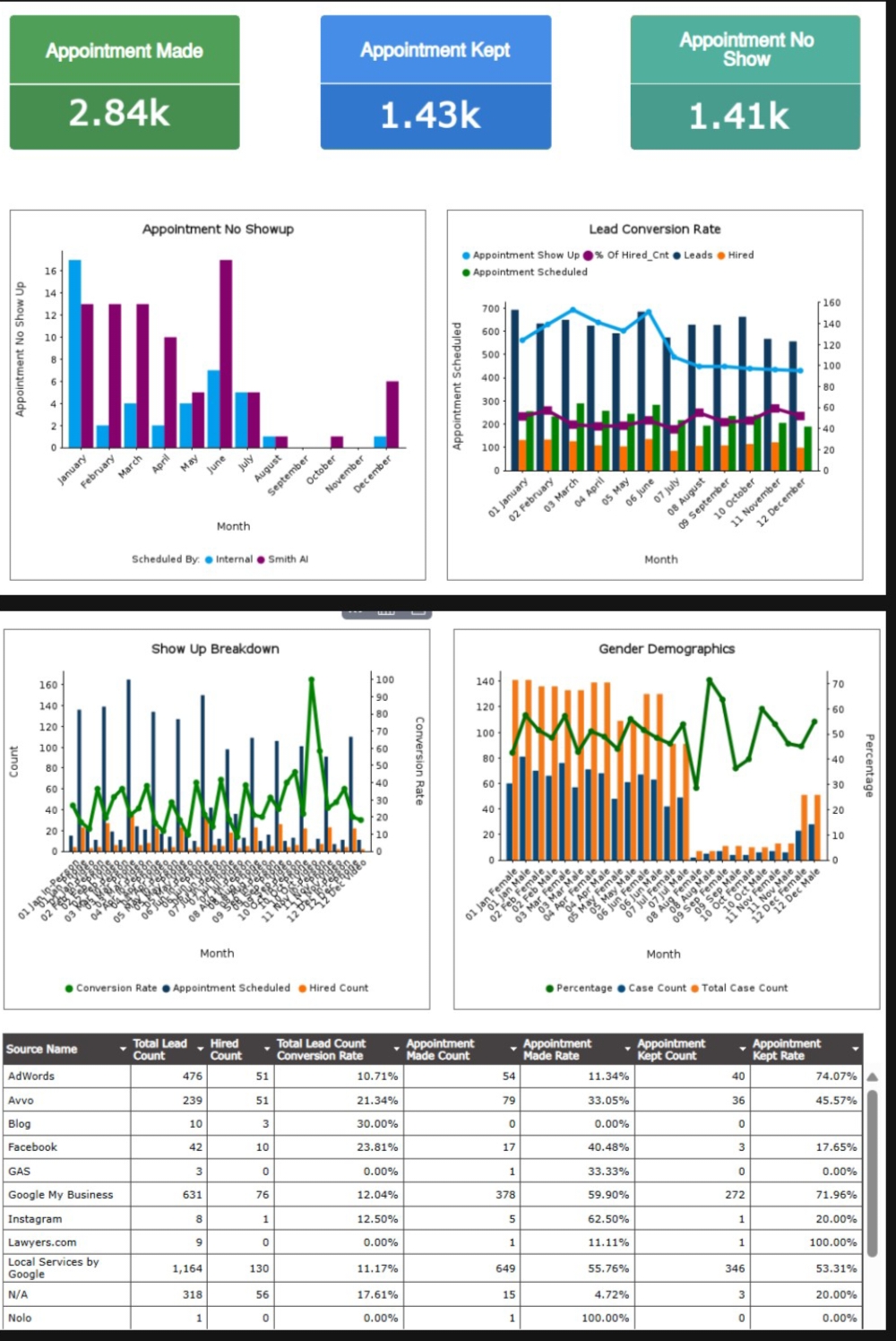
Components of Lawmatics Insights Dashboard:
1. Appointment Scheduled
The Appointment Scheduled tile provides a snapshot of the total number of appointments scheduled within a specified period. This metric is derived from the custom field “Appt. made,” which marks when an appointment is scheduled.
2. Appointment Show Up
The **Appointment Show Up** tile reveals how many scheduled appointments were honored. It draws data from the custom field “Appt. kept,” which indicates that the client attended the appointment.
3. Appointment No Show Up
Conversely, the **Appointment No Show Up** tile displays the number of scheduled appointments where the client did not attend. This is determined by the absence of the “Appt. kept” custom field selection.
4. Appointment Scheduled Type
This tabular report breaks down the number of appointment no-shows month-wise, categorized by the person who scheduled them. It uses the “scheduled by” field in Lawmatics to identify the scheduler and distinguishes appointments based on whether the “Appt. kept” field is selected.
5. Lead Conversion
The Lead Conversion tabular report offers insights into lead management effectiveness. It includes metrics such as total leads acquired, appointments scheduled, appointments attended, and the conversion rate. The conversion rate signifies the percentage of appointments scheduled that resulted in client retention or hiring.
6. Show Up Breakdown
The Show Up Breakdown tabular report further dissects appointment types based on a custom field called “Type of Appointment.” It reveals the number of appointments scheduled, the count of successful hires resulting from those appointments, and the corresponding conversion rates.
7. Gender Demographics
The Gender Demographics report provides a comprehensive view of case distribution across genders on a month-to-month basis. It details case counts, total cases, and percentage breakdowns for each gender category, utilizing gender as a custom field.
Understanding the Value:
1. Strategic Insights
Law firms can leverage these insights to optimize their scheduling processes, improve client retention rates, and enhance overall operational efficiency. By monitoring these KPIs closely, firms can identify trends, allocate resources effectively, and streamline their service delivery.
2. Customization and Adaptability
The flexibility of Lawmatics Insights Dashboard allows firms to tailor reports to their specific needs. Whether analyzing appointment trends, evaluating lead conversion rates, or understanding demographic patterns, the dashboard provides a robust platform for data-driven decision-making.
3. Actionable Intelligence
Ultimately, the goal of the Lawmatics Insights Dashboard is to transform raw data into actionable intelligence. By empowering legal professionals with comprehensive analytics, Lawmatics enables firms to make informed decisions that drive growth, enhance client satisfaction, and maximize operational efficiency.
In conclusion, the Lawmatics Insights Dashboard stands as a pivotal tool for modern law practices seeking to harness the power of data analytics. By embracing these insights, firms can navigate complexities, capitalize on opportunities, and steer towards sustained success in today’s competitive legal landscape.
For more such information on dashboards and reports, please logon to www.lawkpis.com.

Related Posts